Emulating an Enterprise Data Platform (Part 1): Generators
Introduction
In previous projects, I have built smaller data pipelines that pull data from one or two sources, such as an API or a CSV file. These projects taught me a lot about moving, validating, transforming, and querying data, but they always felt like they were missing something. I could successfully move data from one source to another, validate it, and perform queries to answer questions, but I wanted a bigger challenge.
So I decided to build my own enterprise data platform.
Building the platform myself gives me complete control over the entire process, from generating the data all the way through ingestion, transformation, storage, and analysis. Rather than simply finding existing datasets and building a pipeline around them, I wanted to create an environment where I could control the data sources, the formats, and the problems the platform would need to solve.
To accomplish this, I decided to emulate a B2B SaaS company. This gives me the opportunity to create many of the systems and data domains you would expect to find in a real organization: customers, products, subscriptions, orders, payments, and more.
Just as importantly, these systems won’t all produce data in the same way. Some data will be generated as JSON, some will come from CSV files, some will be exposed through APIs, and others will live in a PostgreSQL database. This will allow me to build a platform that has to deal with the kinds of variety and complexity that exist in a real enterprise environment.
From that idea, DataForge was born.
This also isn’t going to be the typical project write-up that happens after everything is finished, where I highlight the key components, lessons learned, and takeaways. Instead, I’m going to document DataForge as I build it.
Each part of this series will focus on a specific milestone or component of the platform. I’ll document the decisions I make, the problems I encounter, the reasoning behind the solutions, and what I learn along the way.
As the title suggests, this first part is going to focus on the generators.
Before DataForge can ingest, transform, or analyze data, it needs data to work with. The generators will be responsible for creating that data and forming the foundation for everything that comes after them.
The Generators
Before building the generators, I needed to decide what kind of data DataForge would actually need.
Because I’m modeling the platform around a B2B SaaS company, I started with two of the most fundamental entities: customers and products.
These two generators are intentionally fairly simple. At this stage, I’m more interested in establishing the foundation and defining how DataForge will create data than I am in building complex relationships between entities. Those relationships will become increasingly important as additional generators are added.
Customer Generator
The first generator I built was the CustomerGenerator.
Customers are one of the core entities within the DataForge environment. Eventually, customers will be related to many of the other entities in the platform, including subscriptions, orders, support activity, and potentially other customer-related events.
The generator currently produces fields such as:
- Customer ID
- First and last name
- Email address
- Subscription type
- Account status
- Date of birth
- Address information
I use Faker to generate realistic values rather than relying on hard-coded test data. This gives me the ability to generate datasets of different sizes while keeping the data synthetic.
One of the first decisions I made was how to handle customer IDs. Rather than allowing Faker or another random generator to produce arbitrary IDs, DataForge begins customer IDs at 1000 and increments from there.
This gives me predictable, unique identifiers that I can later use when establishing relationships between datasets.
The basic structure of a generated customer currently looks something like this:
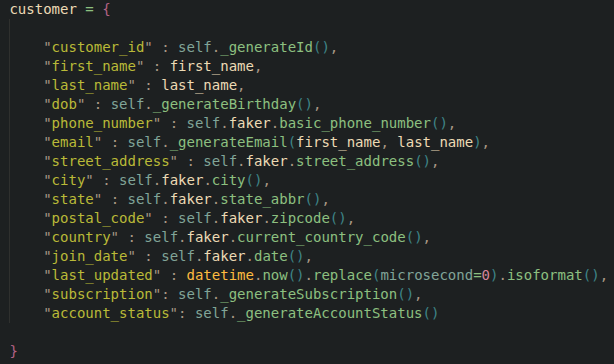
The generator then writes these records to the appropriate output format.
At this point, the customer generator isn’t particularly complicated—and that’s intentional. The goal is to create a reliable source of synthetic customer data that I can build upon as the platform develops.
Product Generator
With customers established, I needed another fundamental entity for the platform: products.
The ProductGenerator is responsible for creating the products that the fictional SaaS company offers to its customers.
The generator currently creates information such as:
- Product ID
- Product name
- Pricing information
- Billing Cycle
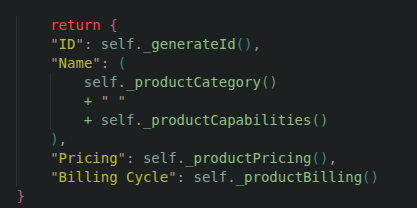
One of the things I wanted to avoid was creating a completely generic list of products that had no relationship to the fictional company I’m modeling. Instead, I created a collection of product categories that would be appropriate for a B2B technology company.
For example:
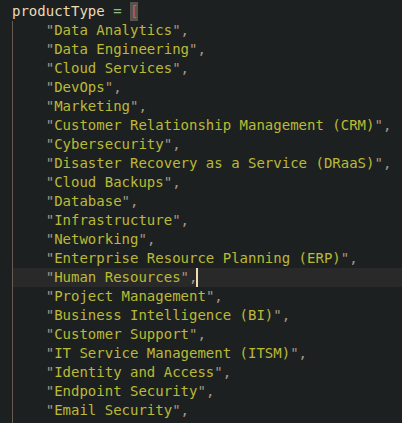
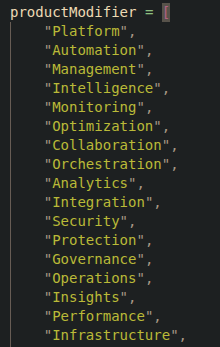
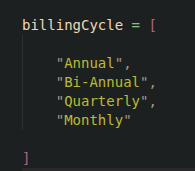
The generator can then use these categories when creating individual products.
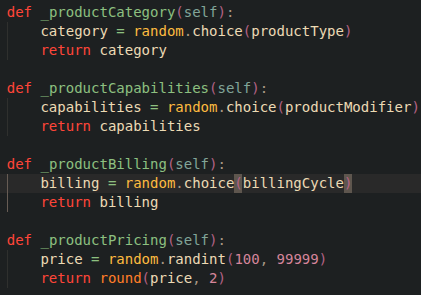
Again, the goal at this stage isn’t to create the perfect product catalog. It’s to establish another reliable data source that can eventually interact with the customer data.
Generators in Action
With both generators complete, I now have the first pieces of actual data that will eventually flow through the DataForge platform.
At this point, the generators are intentionally independent. The customer generator knows how to create customers, and the product generator knows how to create products, but there are not yet any relationships between the two. That will come later as additional components of the platform are developed.
For now, I wanted to verify two things: can the generators consistently produce valid data, and does the resulting data look like something I could realistically build a data platform around?
Running the CustomerGenerator produces a dataset containing the fields defined earlier. A small sample might look something like this:
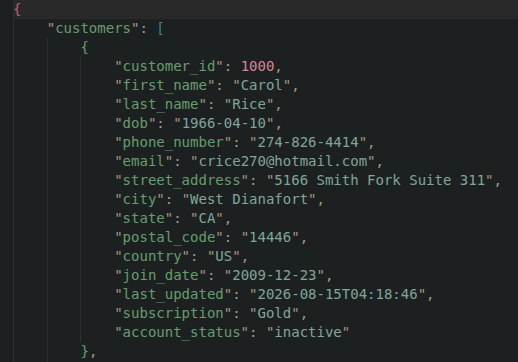
The important part here isn’t the individual values. These records are synthetic and exist primarily to give DataForge something realistic to work with. What matters is that the generator can produce a consistent structure every time it runs.
The same approach is used for products. The ProductGenerator creates records representing the products offered by the fictional SaaS company.
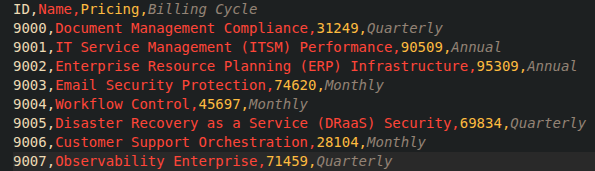
These datasets may look fairly simple right now, but they provide something important: a controlled source of data that I can continue building on.
If I decide that I need 100 customers for a test, I can generate 100. If I need 10,000 customers to test a pipeline, I don’t need to manually create them. I can simply change the number of records the generator produces.
The same applies to products and, eventually, every other entity in the DataForge environment.
What’s Next
The customer and product generators give DataForge its first sources of synthetic data, but they are only the beginning.
The next stage will be expanding the data model with additional entities such as subscriptions, orders, employees, and other systems that would exist within a B2B SaaS environment.
More importantly, these entities will eventually need to interact with one another. A customer shouldn’t simply exist independently from a product; customers should be able to purchase products, maintain subscriptions, place orders, and interact with other systems within the platform.
Establishing those relationships will be an important next step in the project. Once the data model begins to take shape, I’ll be able to start building the pipelines that move this data through the platform.
The generators will also eventually produce data in different formats and from different sources. Some datasets will be written to CSV or JSON, while others will be exposed through APIs or stored in PostgreSQL.
From there, DataForge will begin to look less like a collection of data generators and more like the enterprise data platform I originally set out to build.
For now, however, the first pieces are in place. DataForge can generate its first customers and products, and I now have a controlled source of data to build the rest of the platform around.
This is only Part 1.