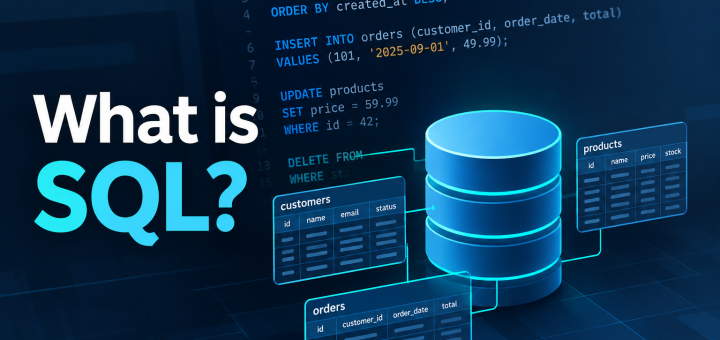
What is SQL?
If you’ve worked with a database, you’ve probably encountered SQL.
You may have seen statements like:
SELECT *
FROM customers;
Or perhaps something more complicated:
SELECT
    customers.name,
    orders.order_date,
    orders.total
FROM customers
JOIN orders
    ON customers.id = orders.customer_id
WHERE orders.total > 100;
At first glance, SQL can look like another programming language. It has keywords, syntax, rules, and a specific way of expressing what you want the computer to do.
But SQL is different from most programming languages.
SQL is a language for working with data stored in relational databases.
It allows us to retrieve data, filter it, combine it, modify it, and define the structure in which that data is stored.
Understanding what SQL is and isn’t is an important first step toward working effectively with databases.
What Does SQL Stand For?
SQL stands for Structured Query Language.
It was designed as a language for interacting with relational databases.
SQL is standardized, but individual database systems implement their own variations and extensions. This means SQL written for one database may not always work exactly the same way in another.
For example, PostgreSQL, MySQL, Microsoft SQL Server, and Oracle Database all support SQL, but each has its own features and syntax differences.
The underlying concepts, however, are largely shared.
What Is a Relational Database?
To understand SQL, it helps to first understand the type of database it was designed to work with.
A relational database organizes information into structures called tables.
A table consists of rows and columns.
For example, imagine a customers table:
| id | name | status | |
|---|---|---|---|
| 1001 | Alice Smith | alice@example.com | active |
| 1002 | Bob Jones | bob@example.com | active |
| 1003 | Carol Davis | carol@example.com | inactive |
Each row represents a record.
Each column represents an attribute of that record.
The database can contain many tables, with relationships between them.
For example:
customers
    |
    | customer_id
    v
orders
A customer can have multiple orders, and each order belongs to a customer.
SQL gives us a way to work with these tables and the relationships between them.
SQL Is a Language, Not a Database
This distinction is important.
SQL is not a database.
SQL is the language used to communicate with a database.
PostgreSQL, MySQL, SQL Server, and Oracle Database are database management systems (DBMSs).
You can think of the relationship like this:
      You
       |
       |  SQL
       v
  +-----------+
  |   DBMS    |
  +-----------+
       |
       v
    Database
When you write a SQL statement, the database management system receives that statement, interprets it, determines how to execute it, and returns the result.
For example:
SELECT name
FROM customers;
You’re telling the database:
Return the name values from the customers table.
The database system handles the work required to locate and return that information.
What Can SQL Do?
SQL is capable of much more than retrieving data.
At a high level, SQL allows us to perform four major types of operations.
Retrieve Data
The most familiar use of SQL is querying data.
SELECT name, email
FROM customers;
This asks the database to return specific columns from the customers table.
We can also filter the results:
SELECT name, email
FROM customers
WHERE status = 'active';
Now only active customers are returned.
Insert Data
SQL can also add new records.
INSERT INTO customers (name, email, status)
VALUES ('David Brown', 'david@example.com', 'active');
This creates a new row in the customers table.
Modify Data
Existing records can be changed with UPDATE.
UPDATE customers
SET status = 'inactive'
WHERE id = 1003;
The WHERE clause determines which rows are modified.
Without it, the statement could modify every row in the table.
Delete Data
SQL can also remove records.
DELETE FROM customers
WHERE id = 1003;
Again, the WHERE clause determines which records are affected.
These four operations—retrieving, inserting, modifying, and deleting data—form a large part of everyday SQL usage.
SQL Can Work With Multiple Tables
One of the most powerful aspects of relational databases is that information doesn’t have to be stored in one enormous table.
Instead, related information can be separated into different tables.
For example:
Customers
| id | name |
|---|---|
| 1001 | Alice Smith |
| 1002 | Bob Jones |
Orders
| id | customer_id | total |
|---|---|---|
| 5001 | 1001 | 125.00 |
| 5002 | 1001 | 75.00 |
| 5003 | 1002 | 240.00 |
The customer_id in the orders table connects an order to a customer.
SQL allows us to combine this information using a JOIN.
SELECT
    customers.name,
    orders.total
FROM customers
JOIN orders
    ON customers.id = orders.customer_id;
The result might look like:
| name | total |
|---|---|
| Alice Smith | 125.00 |
| Alice Smith | 75.00 |
| Bob Jones | 240.00 |
This ability to work across related tables is one of the fundamental strengths of relational databases.
SQL Is Declarative
One of the most important concepts to understand about SQL is that it is largely declarative.
With a traditional programming language, you often describe how something should happen.
For example, you might write a program that:
- Opens a file.
- Reads each record.
- Checks whether the record meets a condition.
- Adds matching records to a collection.
- Sorts the collection.
- Outputs the result.
With SQL, you generally describe what data you want.
For example:
SELECT name
FROM customers
WHERE status = 'active'
ORDER BY name;
You don’t tell the database exactly how to locate the rows or how to sort them internally.
You describe the desired result.
The database management system determines how to execute the request.
This distinction becomes especially important as databases become larger and queries become more complicated.
A database may have multiple ways of executing the same SQL statement. The database’s query optimizer can evaluate different execution strategies and choose one it considers appropriate.
That means two queries that produce the same result can potentially have very different performance characteristics.
SQL Has Different Parts
SQL isn’t one single type of command.
It contains several groups of statements that serve different purposes.
For example, statements that retrieve and manipulate data include:
SELECT
INSERT
UPDATE
DELETE
These are commonly associated with Data Manipulation Language (DML).
SQL also contains statements for defining database structures:
CREATE TABLE
ALTER TABLE
DROP TABLE
These are generally associated with Data Definition Language (DDL).
There are also statements and concepts for controlling access, transactions, and other database operations.
You don’t need to memorize all of these categories to start using SQL. They become more useful as you learn how databases are structured and managed.
SQL Is More Than SELECT
When people first learn SQL, they often associate it almost exclusively with SELECT.
That’s understandable.
SELECT is one of the most frequently used SQL statements, and it’s the foundation of querying data.
But SQL encompasses much more:
SQL
├── Query data
│   └── SELECT
│
├── Modify data
│   ├── INSERT
│   ├── UPDATE
│   └── DELETE
│
├── Define structures
│   ├── CREATE
│   ├── ALTER
│   └── DROP
│
├── Control transactions
│   ├── COMMIT
│   └── ROLLBACK
│
└── Control access
    ├── GRANT
    └── REVOKE
Each of these areas becomes useful in different situations.
SQL vs. a Programming Language
SQL and programming languages such as Python serve different primary purposes.
Python is a general-purpose programming language. It can be used to build applications, process files, interact with APIs, perform calculations, automate tasks, and much more.
SQL is specialized around interacting with data in database systems.
That doesn’t mean SQL and programming languages are competitors.
In real-world applications, they are often used together.
For example:
Python Application
       |
       | SQL
       v
   PostgreSQL
       |
       v
     Data
A Python application might use SQL to retrieve customer information from PostgreSQL, process that information, and then perform another database operation.
This combination is extremely common in data engineering, software development, automation, and database administration.
SQL and Database Systems
There are many database systems that support SQL.
Some commonly encountered examples include:
- PostgreSQL
- MySQL
- MariaDB
- Microsoft SQL Server
- Oracle Database
- SQLite
They all support SQL, but they aren’t identical.
Each system has its own implementation details, extensions, functions, data types, administrative tools, and performance characteristics.
For example, PostgreSQL provides functionality that may not exist in another database system, while another database may have its own features that PostgreSQL does not provide.
This is why learning SQL concepts is valuable even if you eventually specialize in one particular database system.
The fundamentals transfer.
Why Learn SQL?
Data is everywhere.
Applications, websites, businesses, monitoring systems, financial systems, and countless other technologies rely on databases to store information.
SQL provides a standardized way to interact with much of that data.
Learning SQL gives you the ability to:
- Retrieve information from databases
- Analyze data
- Combine information from multiple tables
- Modify stored data
- Understand database structures
- Troubleshoot database queries
- Build applications that interact with databases
- Work with data pipelines and ETL processes
- Communicate more effectively with database systems
More importantly, learning SQL teaches you to think about data relationships and how information is organized.
That becomes increasingly important as the amount and complexity of data grows.
SQL Is a Foundation
SQL is relatively easy to start using.
A simple query can be only a few lines:
SELECT *
FROM customers;
But SQL has considerable depth.
As you progress, you’ll encounter:
- Filtering
- Sorting
- Aggregation
- JOINs
- Subqueries
- Common Table Expressions
- Window functions
- Transactions
- Constraints
- Indexes
- Query optimization
- Execution plans
The syntax is only part of the skill.
The more important skill is learning to understand what the data represents, how tables relate to one another, and how the database will interpret your query.
What’s Next?
Now that we understand what SQL is, we can start looking at the language itself.
The SQL Toolkit series will break SQL down into individual tools and concepts, starting with one of the most fundamental statements:
SELECT
In the next article, we’ll look at how SELECT works, how to choose the data you want, and the basic structure of a SQL query.
That foundation will give us everything we need to start building more complex queries from there.