
Introduction to Databases
You get paid today and open your banking app, expecting to see your new balance reflected. You watch your favorite show on Netflix, stop halfway through an episode, and later return to find that your progress was saved. Or you finally obtain a legendary piece of armor in your favorite video game, customize it with new stats, and expect those changes to still be there the next time you log in.
Behind the scenes, a database is responsible for storing this information and keeping track of changes. It remembers your account balance, your viewing progress, and the items your character owns. When information changes, such as depositing money, finishing an episode, or upgrading an item, the database updates that information so it can be retrieved later.
Databases allow applications to store, organize, update, and retrieve information. But what exactly is a database, and how does it work?
So, What Exactly Is a Database?
A database is a structured system that allows information to be stored, retrieved, updated, and managed efficiently. Instead of keeping data in documents, or spreadsheets, a database allows you to keep related information in a single system.
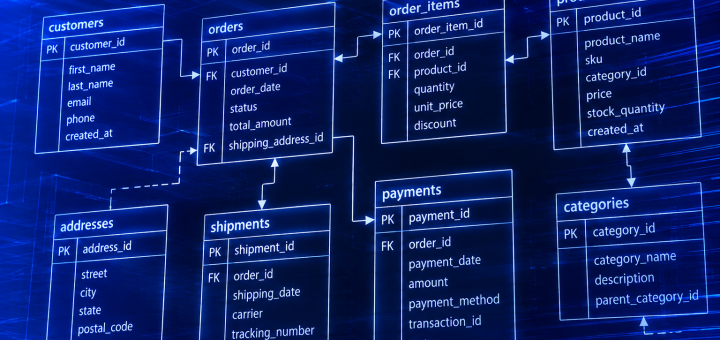
Imagine an online store. Instead of having one spreadsheet for customers, another document for orders, and another for products, a database keeps all of that information together in a way that allows it to be connected. When you view an order, the database already knows which customer placed it, which products were purchased, and where they should be shipped.
The Building Blocks of a Database
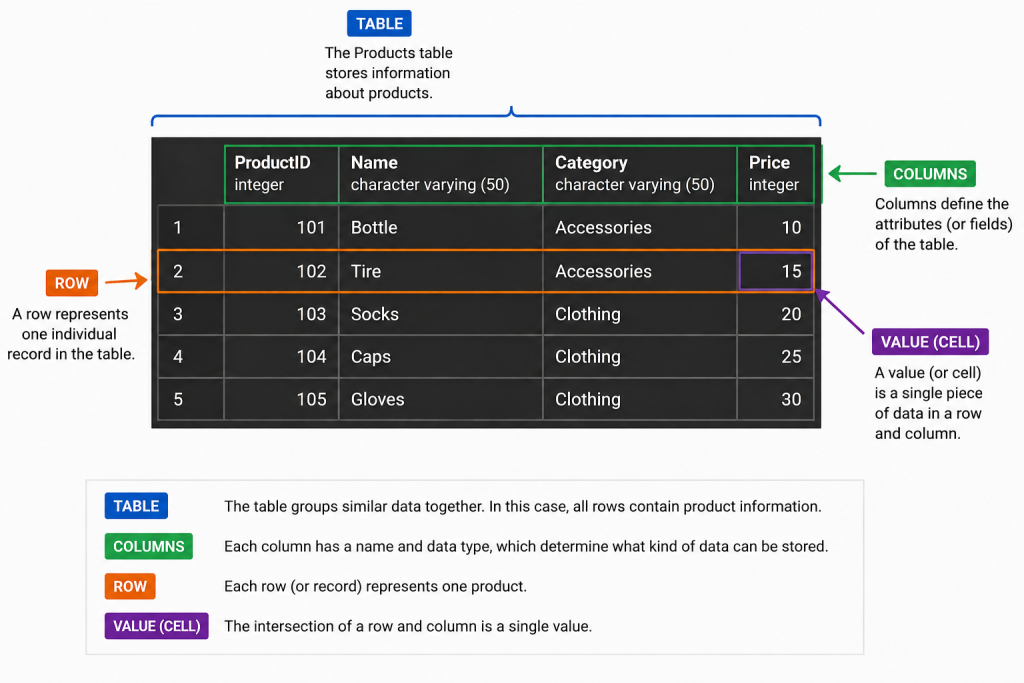
Most databases consist of tables, rows, and columns.
A table is a collection of columns and rows that represent similar objects or entities. A table may contain information about customers, orders, or products. Each entity stored in a table has attributes that describe it. For example, a product may have attributes such as ProductID, Name, Category, and Price. Columns define these attributes and determine what type of information can be stored. Rows contain the actual values for each individual record. In the Products table, each row represents a single product, while each column represents a specific attribute of that product.
Why Not Just Use a Spreadsheet?
At first glance, a database table can look very similar to a spreadsheet. Both store information in rows and columns, and for small amounts of data, a spreadsheet can be a great tool. However, as the amount of data grows and more people need to access it, spreadsheets can become difficult to manage. It becomes easier for information to be accidentally changed, duplicated, or lost.
Databases are designed to organize and manage information at a much larger scale. They provide structure, consistency, and ways to safely store and retrieve data. While a spreadsheet is useful for personal tracking or simple lists, databases are built for situations where data is important, shared by many users, and needs to remain accurate over time.
How Databases Stay Organized
As information grows, simply storing data is not enough. A database needs a way to keep information organized, consistent, and easy to find. Databases accomplish this by structuring data into related tables, where each table stores information about a specific type of thing.
For example, an online store may have separate tables for customers, products, and orders instead of keeping everything in one large list. The database can then connect these tables together to understand which customer placed an order or which products belong to that order.
This organization helps prevent confusion, reduces duplicate information, and makes it easier to update and retrieve data. Instead of searching through a large collection of information, a database knows where different types of data belong and how they relate to each other.
What Can You Do With a Database?
Databases are used almost everywhere to store, manage, and retrieve information. Whenever an application needs to remember something, there is a good chance a database is involved behind the scenes.
A database can store information such as customer accounts, product catalogs, financial transactions, medical records, website content, or game progress. Applications use databases to save new information, find existing information, update records, and remove data that is no longer needed.
For example, when you log into a website, the application checks a database to verify your account information. When you purchase something online, the database records your order, updates inventory, and stores your payment information. When you return to a game, the database may load your character, progress, and saved items.
At its core, a database helps applications keep track of information and make that information available when it is needed.
Following Data Through a Database:
Imagine you receive your paycheck and log in to your banking app to check your account balance. Behind the scenes, the database performs several tasks to make that information available.
- Payroll is received – Your employer sends payroll information to your bank.
- Your account is located – The database identifies your account using information such as your account number or customer ID.
- Your balance is updated – The deposit amount is added to your existing account balance.
- The transaction is recorded – A record of the deposit, including the date, amount, and transaction type, is stored in the database.
- You open your banking app – The application requests your account information from the database.
- Your account information is retrieved – The database returns your current balance, recent transactions, and other account details to the application.
- Your balance is displayed – The banking app presents the updated information on your screen.
This simple process demonstrates several of the core functions of a database:
- Store new information, such as a deposit or withdrawal.
- Retrieve information when it is requested.
- Update existing records, like your account balance.
- Organize related information, including customer accounts, transactions, and payment history.
Real World Applications
| Industry | Type of Data Stored |
|---|---|
| Banking | Accounts, Transactions |
| Healthcare | Patients, Appointments |
| Retail | Products, Inventory |
| Streaming | Movies, Watch History |
| Gaming | Characters, Inventory |
| Social Media | Users, Posts, Messages |
Types of Databases
Not all databases are built the same way. Different types of databases are designed to handle different kinds of information and workloads. The best choice depends on how the data is structured, how it needs to be accessed, and what the application needs to accomplish.
The most common type of database is a relational database. Relational databases store information in tables made up of rows and columns, similar to the examples covered earlier. They are widely used for applications that need structured data, such as banking systems, business applications, and customer management systems.
Another type is a NoSQL database, which is designed to store data in more flexible formats. Instead of relying on traditional tables, NoSQL databases can store information as documents, key-value pairs, or other structures. They are often used for applications that handle large amounts of rapidly changing data, such as websites, mobile applications, and real-time systems.
There are also specialized databases designed for specific purposes. For example, some databases are optimized for analyzing large amounts of data, while others are designed to store geographic information, manage time-based data, or support applications that require extremely fast responses.
Although different database types have different strengths, they all serve the same basic purpose: storing, organizing, and providing access to information.
What’s Next?
Databases are the foundation behind many of the applications and services we use every day. From websites and mobile apps to business systems and financial platforms, databases provide a way to store, organize, and access information reliably.
This introduction only covers the basics of what databases are and why they are important. In future articles, we will explore topics such as how databases are managed, how applications communicate with databases, how data is retrieved using queries, and how database administrators keep systems secure and reliable.
Understanding databases is an important step for anyone interested in technology, software development, automation, or data engineering. As we continue exploring these topics, we will move from the basic concepts into the tools and techniques used to work with databases in real-world environments.